Roofing Project Coordinator: Virtual Assistant Help
A roofing project coordinator keeps a job moving from signed proposal to finished roof: ordering materials, scheduling crews, handling permits, sending work orders and updating the customer. Many roofing contractors don't have one, so the work lands on owners, estimators and crew leads. A virtual assistant can fill much of that role remotely, working in your CRM and calendar, while your project manager and crew leads keep the on-site decisions. This guide shows what the assistant coordinates at each stage, using the headings you'd expect on a roofing project coordinator's job list. It is part of our series on the roofing virtual assistant.
What does a roofing project coordinator do?
A roofing project coordinator organizes the paperwork and logistics around each job so crews can focus on the roof. Typical duties include:
• Preparing and sending proposals and following up on approval
• Ordering materials once a contract is signed, and confirming delivery
• Scheduling crews and inspections, with buffer for weather
• Ordering permits and tracking inspections
• Sending written work orders to the crew lead
• Handling change orders in writing
• Updating the customer before, during and after the job
• Handing the finished job to invoicing
It is a role that rewards consistency and clear records, which is why it suits a dedicated assistant.
Can a virtual assistant be your roofing project coordinator?
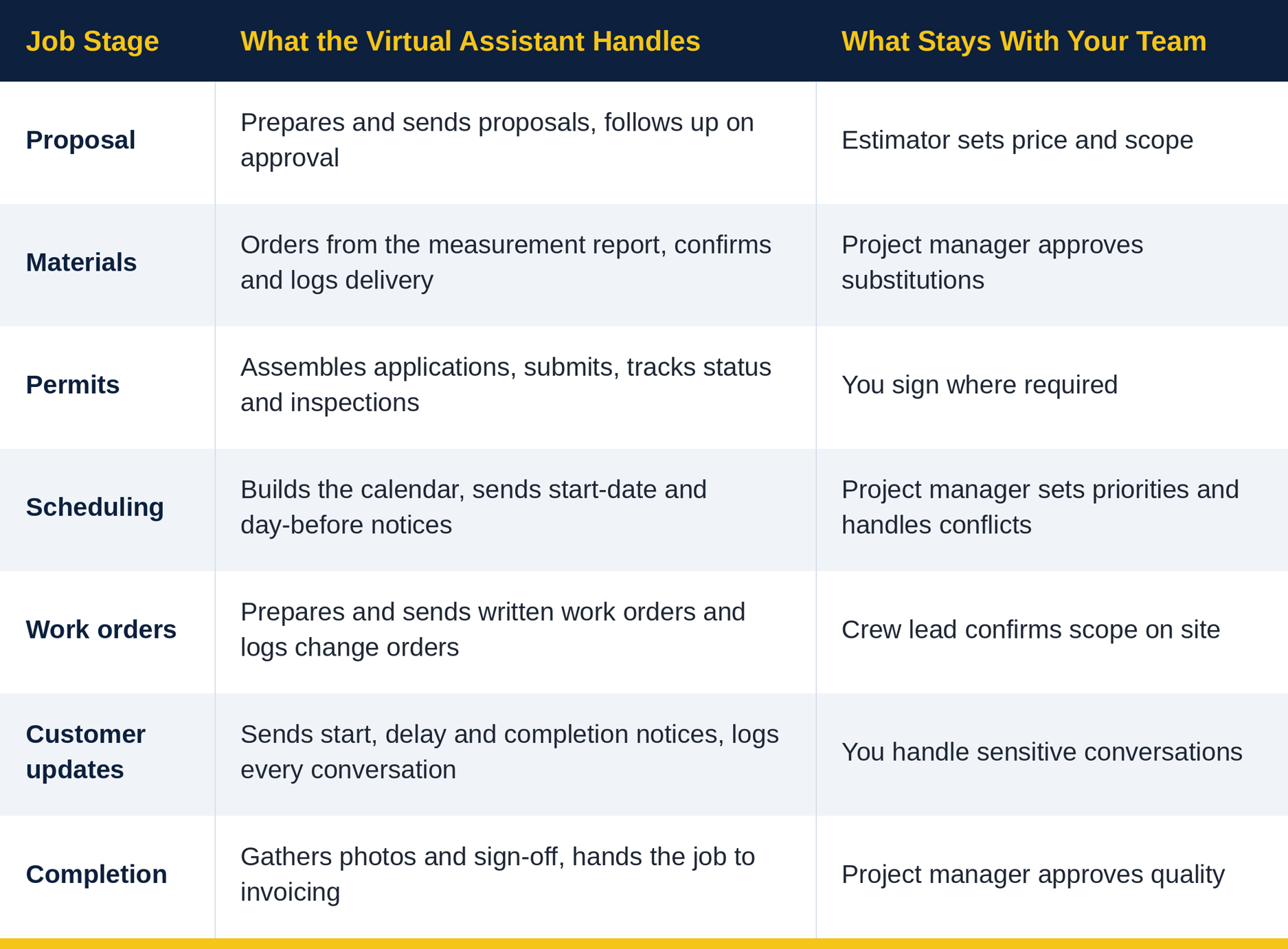
Yes, for the coordination and paperwork side. A virtual assistant can run the schedule, paperwork and communication, while a person on your team makes the calls that need judgment on site. Here is how the work splits across the job.
Roofing estimates and proposals: what can an assistant prepare?
An assistant can prepare the estimate document and keep the approval moving, while your estimator decides the price and scope. In practice, they can:
• Enter measurements into your estimating software
• Format the proposal with itemized costs, accessories and disposal
• Send it for signature and log the response
• Follow up on unsigned proposals on a set schedule
The follow-up cadence is covered in roofing lead follow-up, so the two work together: Spoke 1 keeps leads from going cold, and this stage keeps approved jobs moving.
Roofing crew scheduling: how does an assistant keep jobs moving?
An assistant keeps crew scheduling on track by maintaining one calendar and sending clear notices. Useful habits:
• Schedule by approval date and area, so crews travel less.
• Match crews to job types and confirm availability before committing a date.
• Build in buffer days for weather, and tell customers your weather policy up front.
• Send a start-date notice and a day-before reminder.
• Keep an up-to-date schedule for everyone who needs it.
• Book inspections for the right time based on job progress.
Your project manager still decides priorities when jobs collide or the weather turns.
Roofing material orders: who orders and confirms delivery?
The assistant can place and track roofing material orders so they arrive when the crew needs them. Order once the contract is signed, using the measurement report, confirm any substitutions with the homeowner through your team, and log deliveries. The assistant can also confirm delivery timing with the supplier, for example so materials arrive on the morning of installation if that is your standard. Missed or late deliveries are one of the most common causes of scheduling slips, so a named person tracking them helps.
Roofing permit paperwork: how does an assistant track it?
An assistant can prepare roofing permit paperwork per your jurisdiction's requirements, submit it through the right portal, track its status and follow up until approval. They can also record permit and inspection details in your CRM, so the crew lead and the office see the same information. Requirements differ by city and county, so write down the steps for each area you work in, and confirm any signatures or license details that must come from you.
Work orders and change orders: how do you keep scope in writing?
Every job needs a written work order, and every scope change needs a written change order before work starts. This protects both you and the customer. The assistant can prepare the work order for the crew lead, send it, and log the signed change order before the extra work begins. A change order should state the new scope and price, so there's no dispute later. Anything that affects price or scope goes to your estimator or owner for approval first.
Customer updates: what should the homeowner hear and when?
Regular, predictable updates reduce calls and complaints. An assistant can send:
• A confirmation after the proposal is approved, with next steps
• A start-date notice and a day-before reminder
• Delay notices, with the reason and the new date
• Completion notice and a request for any final questions
Set a cadence, for example a message soon after approval and at regular intervals afterward, and have the assistant log every conversation in the CRM.
Insurance jobs: what changes in the schedule?
Insurance-funded jobs add waiting steps that affect when you order and schedule. A job may not start until the carrier approves the scope, a supplement can change the materials and the first insurance check may need the lender's endorsement. The assistant can track these steps in one place, flag when a job is ready to order or schedule and keep the homeowner informed.
They log and track. Coverage opinions and claim negotiation stay with your team, and some states restrict what contractors and their staff may do, so check your state's rules. For the paperwork side, see our guide to insurance claims support for roofing companies and our recap on how roofers work with insurance companies. Once the job is done, the invoicing and payment tracking is covered in roofing bookkeeping, invoicing and collections.
What stays with your project manager and crew leads?
Keep everything that needs a person on site or a judgment call:
• Pricing, scope and any change that affects either
• Site decisions, safety and quality sign-off
• Crew management and priorities
• Conversations with unhappy customers
• Anything involving what an insurance policy covers
How does Savvital help roofing contractors coordinate jobs?
Savvital gives you a dedicated assistant who works in your tools, keeps the schedule, paperwork and customer updates current and sends an end-of-day report so you can see what was done. Savvital's background is insurance. Its CEO, Troy Thompson, runs an independent insurance agency, so the waiting steps of insurance jobs are familiar territory.
• One dedicated person who learns your process, crews and suppliers
• Low risk: free replacements and a 30-day money-back guarantee
• Your team keeps the decisions: pricing, site calls and quality
Start with one stage, review the work daily for the first couple of weeks, then add more. See our roofing virtual assistant services or pricing.
Ready to get your jobs coordinated?
See how a dedicated assistant could run your schedule and paperwork. Explore our roofing virtual assistant services, read the roofing virtual assistant guide, or book a call.
Keep reading
• Roofing virtual assistant: what to delegate and how to hire one
• Roofing lead follow-up: how a virtual assistant stops leads going cold
• Roofing answering service for contractors
• Roofing bookkeeping, invoicing and collections
• Insurance claims support for roofing companies
Savvital delivers fully managed Virtual Assistants for insurance agencies—combining full-time, pre-trained talent with enterprise cybersecurity.
Published on 4 Nov 2026
Author: Noor Ul Ain Liaqat